When a cloud bill gets uncomfortable, the first instinct is usually to call the provider and ask for a discount, or to start turning things off and see what breaks.
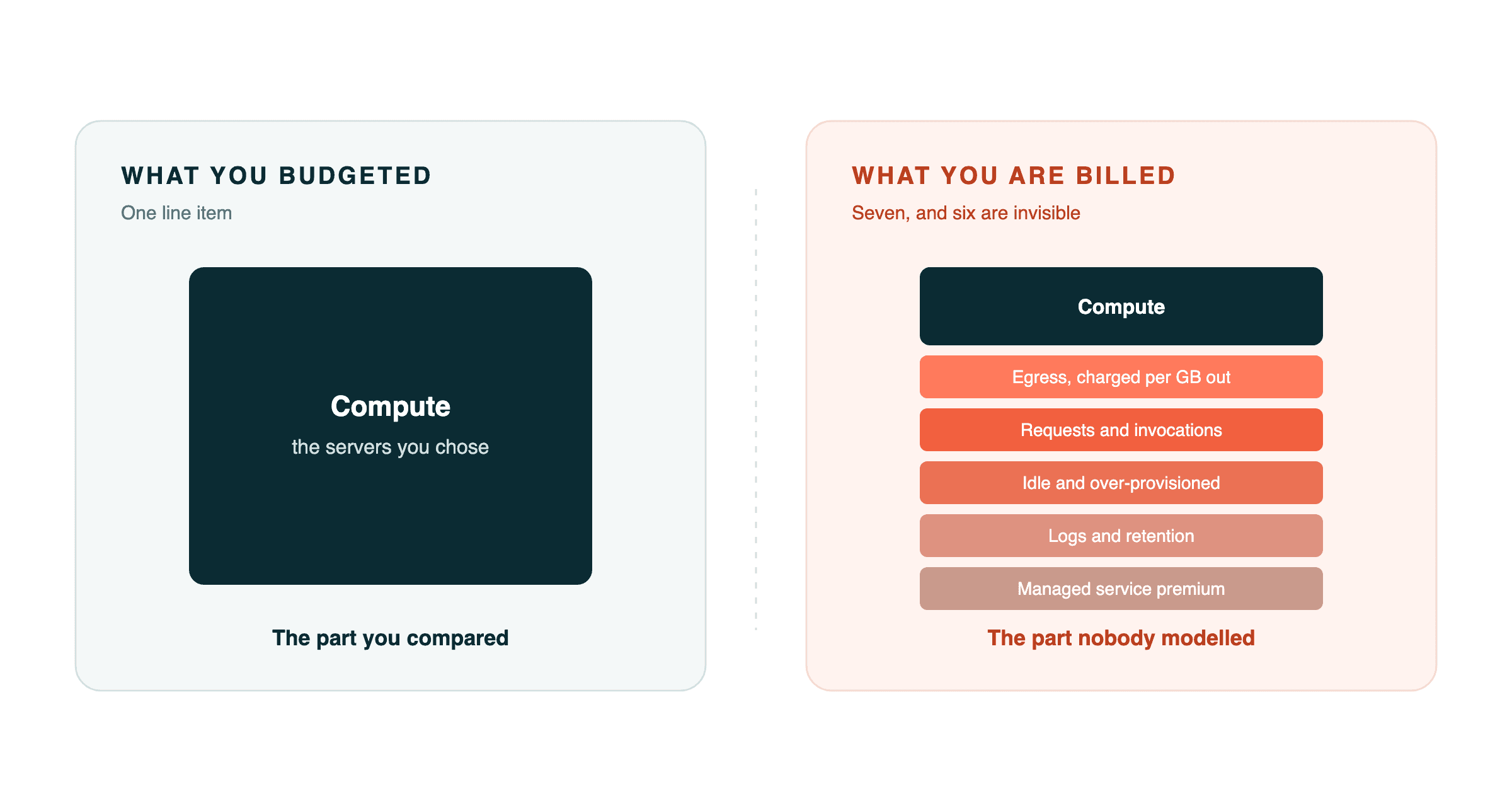
Both skip the useful step. Almost every bill we audit has the same shape: the team budgeted for compute, compared compute prices between providers, and is now paying mostly for six other things nobody modelled.
Here is where the money actually goes, in the order it is usually worth attacking.
1. Egress, which nobody counts
Data going out of the cloud is charged per gigabyte. Data going in is free. That asymmetry is deliberate and it is where a surprising share of bills live.
It shows up in places that do not feel like data transfer: serving images and video straight from object storage rather than a CDN, a backup job shipping to a different provider every night, chatty service-to-service calls crossing an availability zone, a staging environment pulling a production database copy on a schedule.
What to do: pull a month of transfer costs broken down by source. Put a CDN in front of anything user-facing and static, which usually pays for itself immediately. Check whether your inter-service traffic is crossing zones for no reason. That last one is a configuration mistake more often than a design decision.
2. Requests and invocations
Per-request pricing is excellent when traffic is spiky and genuinely idle in between. It is punishing when something runs constantly.
The pattern we see most: a polling loop. A device, a job or a frontend asking has anything changed? on a fixed interval. Every ten seconds is 8,640 requests per day per caller, and each one commonly triggers a chain of a function invocation, a database read and a log line. One ping is rarely one charge.
We took an IoT platform from ₹30,000 a month to under ₹10,000 a year almost entirely by fixing this, and the reasoning behind when to switch applies well beyond IoT. Any frontend polling an API for status has the same shape.
What to do: count your highest-volume request path and work out what fraction of those calls return anything new. Under 10% and you are paying to transmit redundancy.
3. Idle and over-provisioned capacity
Instances sized for a launch-day spike that never came. A database on a tier chosen when someone guessed at load. Development and staging environments running at full size through nights and weekends.
This is the least interesting item on the list and often the biggest single number, because nobody revisits a sizing decision once the system is working.
What to do: look at actual utilisation over 30 days, not peak. If your production database sits at 12% CPU, you are paying four times what you need. Shut non-production environments outside working hours, which is a scheduled job and typically removes two thirds of their cost immediately.
4. Logs, metrics and retention
Observability pricing is usually per gigabyte ingested plus per gigabyte stored, and defaults are generous in the vendor's favour.
Debug logging left on in production after an incident two years ago. Full request and response bodies logged on every call. 90 day retention on everything because nobody picked a number. Custom metrics at high cardinality, which is the one that produces genuinely shocking invoices.
What to do: sample high-volume logs rather than keeping all of them. Set retention by value, so 7 days for application logs and longer only for what you are required to keep. Audit your custom metrics for high-cardinality labels, which is where unbounded cost hides.
5. The managed service premium
This is the one people defend hardest, so it deserves a careful statement.
Managed services are genuinely worth paying for when they remove work you would otherwise do badly: a managed database with automated failover and point-in-time recovery is a real service, and running your own well is harder than teams expect.
What is not worth paying for is a constellation of managed services each carrying its own minimum charge, in front of a workload that is small and steady. A managed queue, a managed cache, a managed search index and a managed scheduler, each modest on its own, add up to more than the application they support. Each also carries a fixed cognitive cost, which is why small teams end up spending a third of their capacity on their own architecture.
What to do: list every managed service and its monthly cost next to what it actually does for you. Anything where the answer is it is a queue, and we process 400 jobs a day is a candidate for something simpler running on infrastructure you already have.
6. Multi-environment and multi-region sprawl
Three full environments when two would do. A disaster recovery region running warm for a product whose customers would accept four hours of downtime. Orphaned resources from an experiment that was abandoned, which nobody deletes because nobody is sure what they do.
What to do: tag everything by owner and environment, then find what has no owner. There is always something. Be honest about your actual recovery requirement rather than the one that sounded responsible when you set it up.
7. The pricing model itself
Only after the six above is it worth looking at commitments and discounts. Reserved capacity and savings plans are real money, often 30 to 50% for workloads you can commit to.
But do this last, deliberately. Committing to a year of capacity you have not right-sized locks in the waste. We have seen teams buy reserved instances for servers they should have deleted.
The three cases where cutting the bill is wrong
Worth saying plainly, because cost optimisation can be taken too far.
When the spend is genuinely buying growth. If your infrastructure cost scales with revenue and the margin is healthy, a rising bill is a healthy signal. Optimise the ratio, not the absolute number.
When engineering time costs more than the saving. Two weeks of a senior engineer's time to save ₹4,000 a month is a bad trade at almost any salary. Rank by annual saving divided by effort, and ignore everything below the line.
When you are cutting reliability to save money. Dropping backups, removing redundancy you actually need, or cutting monitoring are not savings. They are deferred costs with worse timing. The one exception is redundancy for a failure mode your business genuinely tolerates, which is a decision to make explicitly rather than by accident.
How to actually run this
Get the bill broken down by service and by tag. If you cannot attribute costs to a team or a feature, that is the first thing to fix. Untagged spend is unmanageable spend.
Rank by annual saving, not by percentage. A 90% cut on a ₹2,000 line item is noise. A 30% cut on your largest line is the project.
Fix the architecture before negotiating the price. Discounts apply to whatever you are using. Reduce the usage first and the discount compounds.
Re-baseline afterwards. This is the step teams skip. If you re-architect but never resize the infrastructure you provisioned for the old volume, you have done the engineering work and kept paying the old bill.
The checkpoint
The number worth holding onto: if you are paying more than ₹15,000 a month for a workload serving fewer than a hundred devices or a few thousand daily users, something is wrong with the architecture rather than the scale.
That is not a precise threshold, and plenty of businesses legitimately spend far more. But below that level of usage, a bill in that range almost always traces to one of the seven items above, and usually to the first three.
Sample a month of your bill broken down by line item. If compute is less than half of it, you now know exactly which half to look at.
Want someone to run this with you?
We audit cloud and infrastructure spend for Indian businesses, including the architecture underneath it, which is where the durable savings are. Two weeks, fixed scope, a written report with the cost model behind every recommendation. If the numbers do not justify the work, we will tell you that.
Bengaluru-based, working with clients across India and globally.
Get in touch · Read the 97% case study · WhatsApp: +91 9677749648